Checking Dubai traffic fines by plate number is the fastest way to see all violations linked to a specific vehicle, even if you do not have the licence or traffic file details with you.
This guide focuses on checking traffic fines by plate number. If you are looking for a complete overview of how to check and pay traffic and pedestrian fines in Dubai, including jaywalking and parking fines, see our full Dubai fines guide.
Who needs to check fines by plate?
Many drivers only know the plate number when they want to check fines, for example if they are using a company car, a rental vehicle, or they lost their physical licence. A “traffic fine check by plate” is useful in these situations:
- You want to confirm fines before renewing the registration (mulkiya) of a Dubai‑registered car.
- You are buying a used car and want to ensure the plate is clear of unpaid fines.
- You have returned a rental car and want to double‑check that no new fines were recorded.
In Dubai and the UAE, you can do a plate‑based inquiry through Dubai Police, RTA Dubai, Emirates Vehicle Gate (EVG) and Ministry of Interior (MOI)
Traffic fine check by plate on Dubai Police
Dubai Police offers a direct “Fines Inquiry and Payment” service where you can search traffic fines by vehicle plate without logging in Dubai Government
What you can see
- All traffic fines recorded by Dubai Police for that plate (speeding, red light, reckless driving, etc.).
- Details such as violation type, date, location, fine amount and sometimes black points.
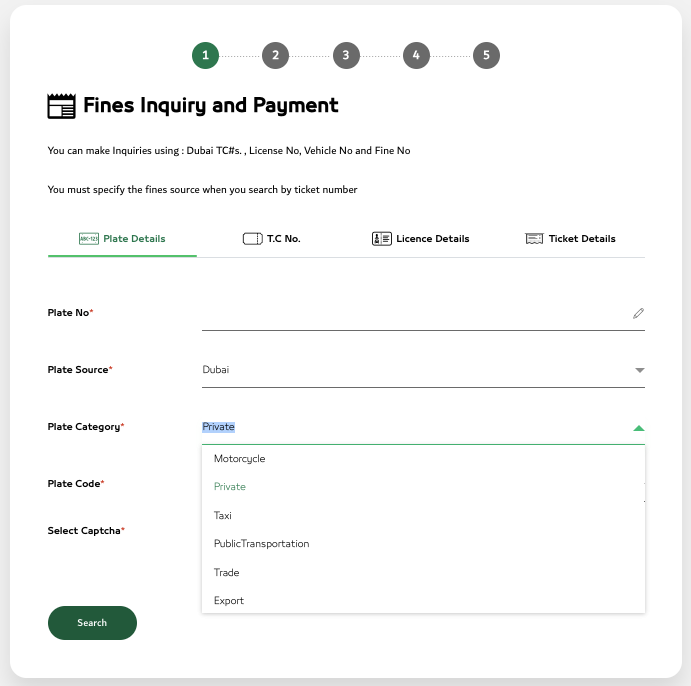
Step‑by‑step (by plate number)
- Open the Dubai Police Fines Inquiry and Payment service page.dubaipolice
- Select the option to search by vehicle plate (Vehicle No / Plate Number).
- Enter:
- Plate number.
- Plate code / category. Private, MotorCycle, Taxi….
- Emirate: select Dubai.
- Confirm the captcha and click Search / Submit.
- A list of all outstanding fines for that plate will appear; you can select them and pay online using card or approved digital methods.
When to use Dubai Police by plate
- You only care about fines within Dubai.
- You want a quick check without creating an account or logging in with UAE Pass.
If you also need information about pedestrian violations or payment options, our Dubai fines guide explains all available methods step by step.
Traffic fine check by plate on RTA Dubai
The Roads and Transport Authority (RTA) also provides an online fines service that lets you check and pay fines by plate number for Dubai vehicles.
What appears in RTA plate inquiry
- RTA‑side traffic fines for your vehicle (speeding, lane discipline, Salik‑related, some parking offences).
- Some fines related to public roads and RTA enforcement cameras.
Step‑by‑step on RTA website
- Go to the RTA traffic fines section on the RTA website
- Click on “Check Your Fines” or the fines inquiry service.
- Choose search by plate as the identification method.
- Enter:
- Plate number.
- Plate category and Emirate (Dubai).
- Press Search to display all fines linked to that plate.
- Add selected fines to the cart and pay online by card or available payment channels.
RTA Dubai app (optional)
You can also use the RTA Dubai mobile app to view fines once your vehicle is linked to your account, although in most cases this requires login with UAE Pass rather than a simple anonymous plate search. This is useful if you frequently manage RTA services like parking and registration through the app.
Traffic fine check by plate on Emirates Vehicle Gate (EVG)
Emirates Vehicle Gate (EVG) is a federal platform that shows vehicle‑related fines across multiple Emirates and requires you to link your car using plate details. EVG website
Why use EVG for plate checks
- You drive the same car between Dubai, Abu Dhabi, Sharjah and other Emirates.
- You want to see all fines issued against that plate number across the UAE, not just in Dubai.
Step‑by‑step on EVG
- Visit the EVG “Pay Traffic Fines” page.evg
- Log in or create an account using your Emirates ID and mobile number.
- Add your vehicle by entering plate number, category, Emirate and traffic file details.
- Open the fines section to view all traffic violations recorded against this plate, including those issued in other Emirates.icartea+1
- Select fines to pay and complete the payment online.
EVG is particularly valuable for fleet owners, company drivers and residents who regularly cross Emirate borders.
Traffic fine check by plate through MOI UAE
The Ministry of Interior (MOI) provides a UAE‑wide traffic fines e‑service where you can search fines using vehicle details, including plate.MOI website
When MOI is useful
- You want a federal view of fines across all Emirates.
- You are not sure whether a specific violation was issued by Dubai Police or another Emirate police.

Step‑by‑step on MOI portal
- Open the MOI traffic fines e‑service page.moi
- Go to the fines inquiry service and choose search option based on vehicle plate.
- Enter plate number, category and the Emirate where the vehicle is registered (Dubai if it is a Dubai plate).
- Submit to view any fines recorded against that plate across MOI‑linked systems.
- Pay the fines directly through the MOI payment gateway if available.
Common issues when checking fines by plate
Even when you have the correct plate, some drivers experience problems with their traffic fine check.
- No fines found but you received an SMS: It may take some time for radar or camera fines to synchronise across all systems; retry later or use the same channel indicated in the SMS (often Dubai Police or RTA).
- Car sold but fines still appear: Some fines are linked to the traffic file or to the period you owned the vehicle; make sure transfer of ownership is properly completed and keep a copy of the sale documents.
- Plate changed (special / new plate): If you changed to a special or personalised plate, older fines may still appear under the previous plate; using a traffic file or licence search sometimes gives a more complete picture.i
In complex cases, visiting a Dubai Police traffic department or RTA service centre with your Emirates ID, licence and registration can help clarify responsibility for specific fines.
Best channel to use by situation
Different situations call for different tools, even when you start from the plate number.
- Dubai‑only, quick check with plate:
Use Dubai Police Fines Inquiry or RTA Check Your Fines by plate.RTA website - Car used across Emirates (Dubai + Abu Dhabi + others):
Use EVG and MOI for a consolidated UAE view.EVG - Buying a used car in Dubai:
Do a plate‑based check on Dubai Police and RTA, and ideally confirm through EVG before finalising the deal.
Practical tips to avoid problems with plate‑based fines
To stay safe and avoid surprises when renewing your registration, consider these best practices.
- Check your plate at least once every few months, especially after long road trips or if you frequently drive in high‑risk zones (speed cameras, school zones, major junctions).
- Always clear fines before registration renewal; Unpaid fines can block registration renewal and may also affect Emirates ID processes. Our guide explains how unpaid fines affect Emirates ID and registration renewal in Dubai.
- When you sell the car, do a final plate check in front of the buyer so both parties know there are no pending fines.

Meet Ghaada Almain: A legal expert with extensive experience in UAE traffic fines, dedicated to assisting you in resolving driving fine issues and navigating the legal complexities with expertise and care. You can see my other articles about UAE information in Hubpages and Clippings.me